Analytics professionals know that simply collecting data doesn't guarantee accurate reporting. A GA4 property can have thousands of events, populated dashboards, and automated reports while still missing critical information or capturing data incorrectly.
Tracking issues can surface when GA4 data is compared against other business systems, after major website updates, or when reporting requirements become more advanced.
Attribution discrepancies, incomplete ecommerce data, and unexpected changes in conversion trends are often signs that the underlying implementation needs to be reviewed.
Keep reading for five indicators that your GA4 setup may need attention.
1. Conversion Numbers Don't Match Across Platforms
One of the most common signs of a tracking issue is when GA4 conversions don't align with other business systems within an expected margin.
GA4 will rarely match another platform exactly because each system has different attribution models, session definitions, and data processing rules. However, significant discrepancies may indicate implementation problems.
Common comparisons include:
- GA4 key events vs. CRM-created opportunities
- GA4 purchases vs. ecommerce platform transactions
- GA4 bookings vs. reservation system data
- GA4 conversions vs. Google Ads reported conversions
- GA4 lead submissions vs. marketing automation platforms
- GA4 revenue vs. financial reporting systems
Common issues include:
- Form submissions tracked only on page views instead of completed submissions
- Phone calls missing from conversion reporting
- Offline conversions not imported into GA4 or connected advertising platforms
- Ecommerce refunds, cancellations, or partial transactions not being reflected
- Revenue discrepancies caused by missing transaction parameters
For example, an ecommerce site may correctly record purchases but fail to pass product-level details, refunds, or transaction adjustments. The result is a GA4 property that appears accurate at a top-line level but lacks the detail needed for meaningful analysis.
When conversion data doesn't align, the issue is often deeper than a single missing event. It may involve how events are configured, how parameters are passed, or how different systems define success.
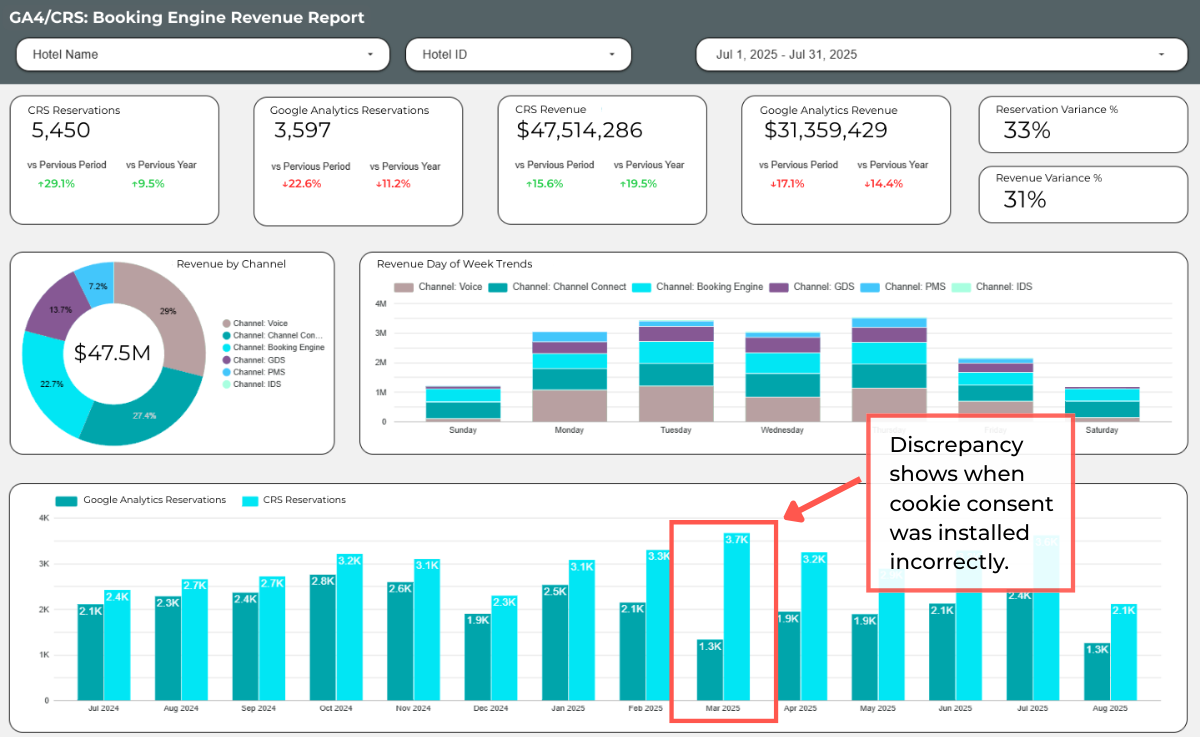
2. Your Data Changed After Implementing Consent Tools
Consent management has become a significant factor in GA4 data collection. While some data reduction is expected when users decline analytics cookies, unexpected changes may indicate a configuration issue.
Potential warning signs:
- A 20%+ decline in traffic immediately after implementing consent controls
- Conversion drops that don't align with changes in user behavior
- Large differences between consented and non-consented traffic
- Events missing after updating cookie banners
- Google Ads and GA4 reporting becoming less consistent after implementation
Consent Mode configuration, tag firing behavior, and regional settings can all influence what data is collected and how modeled data is applied.
For example, if tags are blocked incorrectly before consent status is determined, you may lose more measurement capability than expected. If GTM triggers aren't aligned with consent settings, some events will never reach GA4.
Understanding whether data changes are caused by actual customer behavior or measurement changes is critical when evaluating performance trends.
Related article: How Do Cookie Consent Manager Tools & Settings Affect Data Loss?
3. Traffic Sources Don't Reflect Marketing Activity
GA4 attribution depends heavily on accurate campaign tracking and a consistent customer journey.
When acquisition reports don't align with marketing activity, the issue may be related to tracking configuration rather than campaign performance.
Potential warning signs include:
- Paid campaigns generating traffic but few attributed conversions
- Large increases in Direct traffic without a business explanation
- Email campaigns appearing as Direct or Referral traffic
- Social campaigns missing campaign attribution
- Google Ads and GA4 conversion reporting showing significant differences
Common causes include:
- Missing or inconsistent UTM parameters
- Incorrect campaign naming conventions
- Cross-domain tracking issues or redirects causing data to fall off
- Referral exclusions not configured properly
For businesses with a longer customer journey, attribution issues can be especially difficult to identify. A visitor may first arrive through paid search, return through email, and eventually convert through a booking engine or ecommerce checkout. If each step isn't connected correctly, GA4 may assign credit to the wrong channel.
4. Conversions Increase Without a Clear Business Reason
An increase in conversions is usually a positive sign, but sudden changes without corresponding changes in traffic, campaigns, or business activity may indicate duplicate tracking.
Common causes include:
- The same event firing through multiple tags
- Duplicate Google Tag Manager configurations
- Multiple platforms sending the same event
- Website plugins adding additional tracking
- Purchase events firing before transaction completion
- Incorrect ecommerce parameters affecting revenue calculations
Examples include:
- A purchase event firing on both the confirmation page and through a payment platform integration
- A lead form submission counting both a button click and completed form submission as conversions
- Revenue totals increasing because shipping, tax, or fees are incorrectly included or duplicated
These issues can be difficult to identify because the data often looks reasonable at first glance. A conversion rate that improves significantly should always be evaluated alongside implementation changes and other business metrics.
5. Your Ecommerce Reports Don't Provide Enough Detail
Many ecommerce implementations capture basic purchase information but miss the opportunity to collect more detailed product and customer insights.
An advanced ecommerce data layer can pass additional information into GA4, BigQuery, and reporting platforms, including:
- Product category and subcategory
- Product variant
- Item-level promotions
- Coupon codes
- Shipping methods
- Customer type
- New vs. returning purchaser status
- Refund activity
- Subscription or recurring purchase details
With this information, it becomes easier to answer more complex business questions, such as:
- Which products drive repeat purchases?
- Which promotions increase average order value?
- Which customer segments have the highest lifetime value?
- Which acquisition channels drive profitable customers rather than just conversions?
Updating an ecommerce data layer can significantly expand reporting capabilities without requiring a new analytics platform. It also creates a stronger foundation for analysis in BigQuery and business intelligence tools.
Your Analytics Strategy Should Reflect Your Business
GA4 is a powerful reporting platform, but the quality of your insights depends on the quality and completeness of your implementation.
Tracking gaps can affect attribution, campaign optimization, revenue reporting, customer analysis, and the confidence your organization has in its data.
If your GA4 data doesn't seem to align with your business systems or you need a deeper review of your measurement setup, Calibrate Analytics can help identify gaps and recommend improvements to create more reliable reporting.