
Data analytics teams often spend hours turning GA4 dashboards into guidance others can use, and even with strong reporting tools, that translation layer is usually manual and slow.
While advanced analysis will always require a human touch, automating initial takeaways from GA4 data can provide a solid foundation from which teams can build on and refine with their own expertise.
This article demonstrates how insights and recommendations can be generated dynamically from data warehouse tables, so you don't need to start from scratch with each new reporting cycle.
From Data Warehouse to Your Inbox, Automatically
Using the Launchpad data management platform, GA4 reporting data is extracted on a schedule and stored in a centralized data warehouse such as BigQuery.
Using a Launchpad workflow pipeline, the data is structured and uploaded to an AI agent or assistant. In the case of Chat GPT, Launchpad pushes data to an Open AI storage vector to be used with the client's own assistant and to guide analysis.
The next step in the workflow would be sending prompts to the AI assistant that focus the analysis on what matters most, from performance trends to channel-level and KPI-based recommendations.
Finally, as the last step in the workflow, Launchpad formats and sends a branded email based on the AI assistant's response.
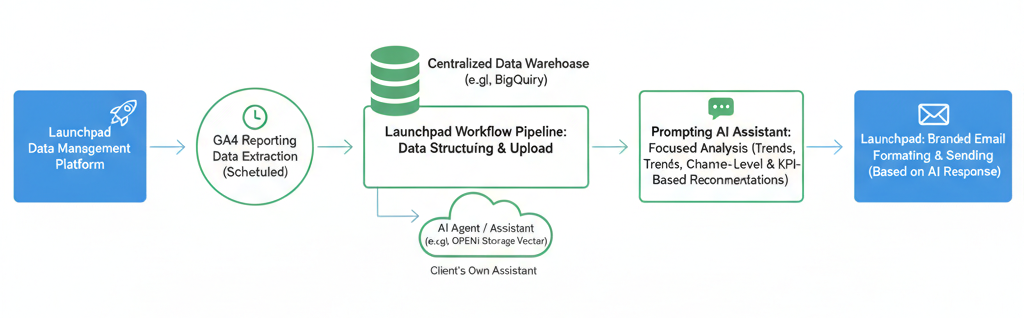
Each reporting period, ChatGPT or other AI assistant produces a clear performance summary based on the latest warehouse data and customized analysis prompt.
The result? Instead of starting the day pulling reports, marketers and analysts find tailored analysis already waiting in their inbox or embedded directly into reporting dashboards.
What Types of GA4 Insights Can Be Automated?
Each summary is shaped around your business's KPIs and reporting priorities. Teams define the dimensions, metrics, and questions that matter most and use those as the foundation for automated GA4 analysis.
To start, many summaries focus on:
- Sessions, users, and conversions by channel
- Engagement and bounce rate trends
- Revenue and conversion performance
- Device and platform behavior
- MoM and YoY comparisons
The output can highlight notable spikes, declines, and patterns, then connects those changes back to likely drivers and practical next steps, like:
- Ramping up high-performing campaigns or time periods
- Identifying landing pages contributing to elevated bounce rates
- Adjusting channel strategy based on engagement or revenue shifts
- Flagging device-level experience gaps
The workflow scales easily across brands, locations, and departments while maintaining consistent reporting standards and company-specific priorities.
The automation creates a consistent interpretation layer on top of GA4 dashboards, so teams are aligned before deeper analysis begins. Decision makers gain clarity without digging through spreadsheets, and analytics teams reduce manual reporting and focus on deeper questions that drive impact.
Built for Real-World Applications
GA4 reporting is just the beginning. The same framework can be applied to CRM data, performance media, social media marketing, internal platforms, and operational data.
Common use cases:
- Paid media and SEO reporting across channels
- Budget pacing and spend vs. forecast summaries
- Revenue performance across products or locations
- Internal operational reporting pulled from finance or CRM systems
Since the summaries are driven by data warehouse tables, marketing and internal data can be analyzed and reported on using the same workflow.
Need Help Getting Started?
Calibrate designs and implements automated data analytics and GA4 reporting workflows end to end.
We handle data extraction, warehouse modeling, reporting structure, scheduling, and delivery. Teams can start with GA4 analytics and expand into paid media, budgeting, or internal systems as needs evolve.
Get in touch to see how automated reporting can fit into your data warehouse and analytics stack.