OpenAI Ads introduces another paid media channel for marketers to incorporate into their reporting. As advertising expands into ChatGPT, access to campaign performance data alongside established platforms like Google, Meta, and LinkedIn becomes increasingly important.
The challenge is getting that data into your existing analytics systems and dashboards. While OpenAI provides an API for accessing campaign and performance data, connector availability across data platforms is still developing.
Launchpad already supports native OpenAI Ads integration, allowing users to automate data extraction and incorporate campaign metrics into their existing reporting without needing to build a custom API connection.
Native OpenAI Ads Integration with Launchpad
OpenAI's Ads API provides access to campaign management, advertising performance, conversion tracking, and reporting data. However, having an available API doesn't automatically make that data accessible within your existing analytics infrastructure and dashboards.
Without native integration support, you need to develop and maintain your own connection, manage API authentication, handle response structures, and account for changes in requirements.
Launchpad eliminates that development overhead with a native OpenAI Ads source. You can connect your advertising account and bring campaign data into the same reporting infrastructure as your other marketing sources.
For anyone managing multiple advertising accounts and reports, this means less time maintaining connections and more flexibility when incorporating new channels into established SOPs.
Which Metrics and Dimensions Are Available?
The OpenAI Ads API supports reporting across multiple levels, including accounts, campaigns, ad groups, and individual ads.
Available performance metrics:
- Delivery: Impressions, clicks, and CTR.
- Cost: Spend, CPC, and CPM.
- Conversions: Attributed conversions, CPA, and post-click conversion rates.
- Purchase performance: Attributed sales and ROAS.
The API also supports breakdowns by country, device, platform, and product. These dimensions give analysts more flexibility when comparing channel performance, investigating campaign results, and building reporting models at different levels of detail.
Automating OpenAI Ads Reporting with Launchpad
Launchpad handles the entire data extraction and transfer process, making it straightforward to incorporate OpenAI Ads into your existing reporting setup.
With the native connector, you can:
- Schedule automated imports of OpenAI Ads reporting data.
- Retrieve campaign metrics without manually exporting reports.
- Transform API responses into structured, query-ready tables.
- Load advertising data into BigQuery for centralized reporting and analysis.
- Combine OpenAI Ads with other connected marketing and business data.
Once loaded, you can use SQL to update existing reporting tables, build cross-channel comparisons, and incorporate OpenAI Ads into dashboards alongside your other advertising platforms.
For agencies, this also means maintaining a consistent approach to client reporting. OpenAI Ads can be managed through the same ETL application as your other connected sources, without introducing another custom integration to maintain.
Get Started With OpenAI Ads Reporting in Launchpad
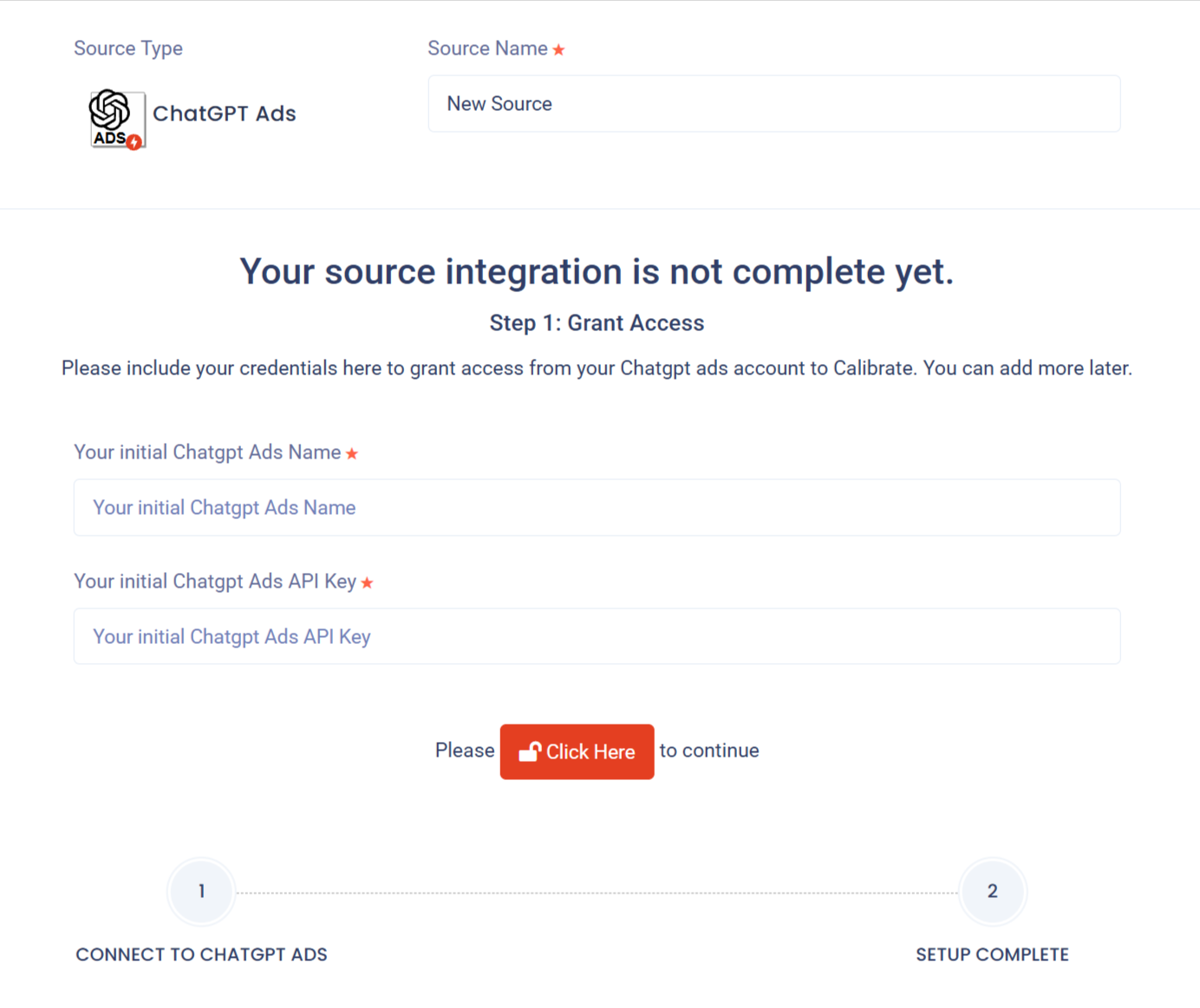
The OpenAI Ads integration is available now in Launchpad. Existing Launchpad users can connect by following these steps:
- Log in to and navigate to your dashboard
- Select Data Transfer ⟶ Data Sources ⟶ Add New Source
- Locate the OpenAI Ads data source and select Add Source
- Enter the required info
You'll need an API key, available through your Ads Manager account settings. Once connected, configure your extraction and destination settings to start moving OpenAI Ads performance data.
New to Launchpad? Start your free trial or get in touch with Calibrate Analytics to learn more about its capabilities.