If your website has contact forms, registration pages, quote requests, or other submission forms, you're probably familiar with the steady stream of spam that comes with them. Automated bots and suspicious users can generate hundreds of records, leaving someone to sort through names, email addresses, and inquiries to determine which ones are legitimate.
That manual review takes time, and the problem often extends beyond the form itself. When every entry flows directly into your CRM, email platform, or reporting pipeline, spam creates clutter, triggers unnecessary notifications, and requires ongoing cleanup. It can also inflate lead counts and introduce noise into your marketing data.
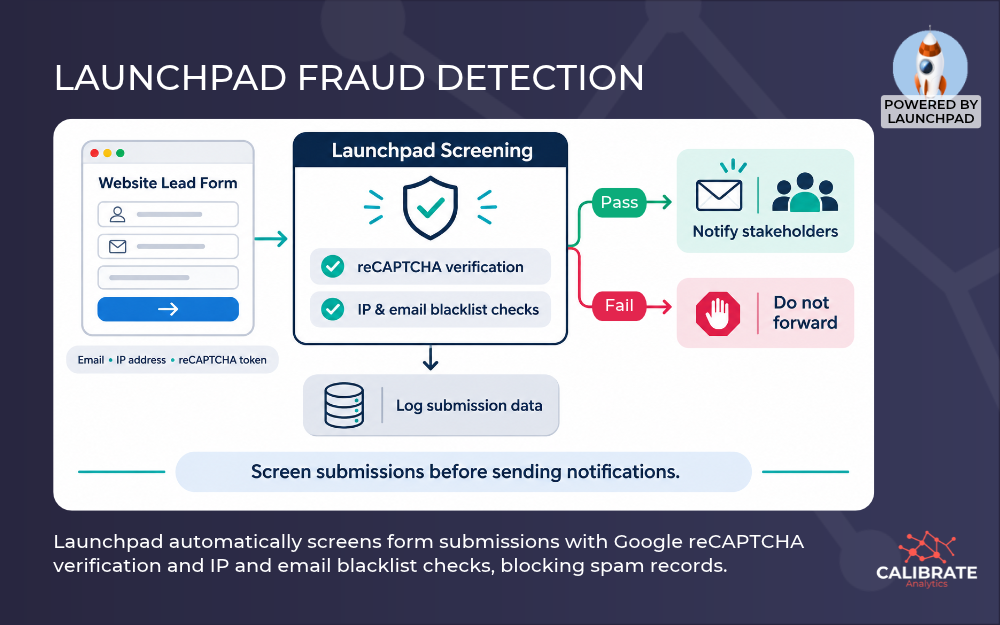
Launchpad's Fraud Detection integration automatically screens incoming submissions before they reach downstream systems. Using Google reCAPTCHA verification along with IP address and email blacklist checks, you can incorporate fraud screening into your data workflows and control which records are recorded.
Two Ways to Validate Incoming Submissions
Launchpad's Fraud Detection destination combines two checks to help identify potentially unwanted submissions. Each provides a different signal for evaluating incoming data.
1. Google reCAPTCHA Verification
If your website form already uses Google reCAPTCHA, Launchpad can handle the server-side verification of the response token generated when someone submits the form.
After you install and configure reCAPTCHA on your website, Launchpad verifies the response within the data workflow and returns the results for subsequent processing.
2. IP Address and Email Blacklist Checks
Launchpad integrates with Blacklist Checker to evaluate submitted IP addresses and email addresses against regularly updated blacklists.
You can check both IP and email addresses to identify suspicious activity based on the reputation of the associated contact details. These checks can also be applied to records from other data sources, making them useful beyond website lead forms.
Together, these checks provide additional information for evaluating submissions. They aren't a guarantee that a record is legitimate or fraudulent, but they give you more criteria for deciding how incoming data should be handled.
Using Fraud Detection in Launchpad
Fraud Detection is configured as a destination in Launchpad. First, you set up the source that collects your form submissions, then select Fraud Detection as the destination to process the incoming data and return validation results, including pass/fail outcomes and applicable scores.
Launchpad handles the verification process and returns the results so you can determine what happens to each record.
For example, a lead generation workflow can:
- Forward only valid submissions to your CRM or lead management platform.
- Flag questionable submissions for additional review.
- Filter out suspicious entries that fail your configured criteria before they trigger downstream jobs or notifications.
You define the rules based on your requirements, giving you control over which submissions move forward and how records that don't meet your criteria are handled.
This is especially useful when processing a high volume of inquiries. Instead of manually reviewing individual form submissions after they've reached your systems, you can screen them earlier in the pipeline. Records that pass your checks continue to their intended destinations, while others can be excluded or handled separately.
Filtering Spam Lead Submissions with Launchpad
In this Launchpad workflow, the lead form collects the visitor's email and IP addresses and uses Google reCAPTCHA. When someone submits the form, Launchpad verifies the reCAPTCHA response and checks both contact details against regularly updated blacklists.
The workflow logs the incoming data and validation results, then evaluates whether the record meets the configured screening criteria.
Submissions that pass are forwarded and trigger an email notification to stakeholders. Those that fail don't generate notifications. The original data and validation results are retained for reference, providing a record of what was received and how it was evaluated.
Here's what the workflow looks like in Launchpad:
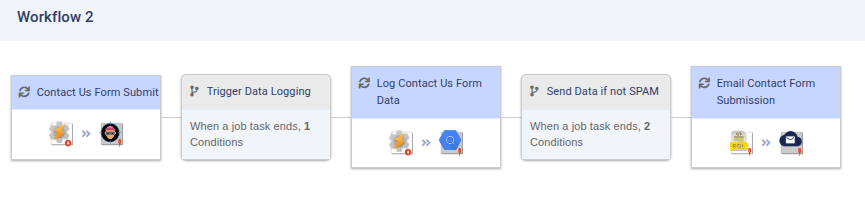
By handling these checks automatically, the process keeps suspicious entries from generating unnecessary notifications. Stakeholders spend less time sorting through spam and more time evaluating genuine inquiries.
The same approach can be used to control which records enter a CRM, trigger marketing automation, or move into reporting systems.
Getting Started with Automated Fraud Detection
Spam form submissions can create unnecessary work across any marketing and reporting process. Launchpad's Fraud Detection destination gives you a way to screen incoming records before they reach other systems, using reCAPTCHA verification and IP and email blacklist checks.
The result is fewer suspicious records, less manual review, and cleaner data for your CRM, marketing platforms, and reporting.
Want to add fraud screening to your data pipeline? Get in touch with Calibrate Analytics to discuss how you can incorporate these checks into your analytics workflow.